Install
Requirements
edxia requires
Note
The Anaconda distribution might be used to install these dependances.
Installation
Installation with conda/mamba
Conda is a package manager design to facilitate installation which comes with pre-packaged software ready for installation, call a distribution. The Glueviz installation guide with conda recommends downloading the Mambaforge distribution, an overlay to conda, to make it easier for users. As edxia is mostly used as a plugin to glue, it is assumed that these instructions have been followed.
With a valid mambaforge distribution, the edxia package can be installed with the requirements using the mamba command
mamba install -c specmicp edxia
Note
-c specmicp indicate that the package is in a special channel (named specmicp) of the author (i.e. not part of a distribution).
If a different distribution was initially installe (e.g. miniconda), the following command might be necessary to use the dependances in the conda-forge distribution
mamba install -c conda-forge -c specmicp edxia
It is possible that edxia get installed even if some dependance are missing, but in this case an old version would be installed which might lead to undesired results. The versions available can be consulted on the edxia package page <conda install specmicp::edxia>.
To update a previous installation, the following command can be executed:
conda update -c specmicp edxia
or
mamba install -c conda-forge -c specmicp edxia
Note
Most of the time, an issue with a Conda installation is linked to an unexpected mismatch of version. Always provide the installed version numbers when reporting an issue.
Installation with pip
The edxia package is uploaded to Pypi, the Python Package Index. Therefore it is possible to install the latest version with its requirements very easily in any valid python installation:
pip install edxia
By default, this command attempt a system-wide installation. The package can be installed for the user only:
pip install edxia --user
To update a previous installation, the following command can be executed:
pip install edxia --upgrade
Installation from sources
The package can be installed directly from the sources. The latest version can be dowloaded directly from the git repository:
git clone https://bitbucket.org/specmicp/edxia.git
It can then be installed with the following commands
cd edxia
python setup.py install
Checking the installation
To check the installation, glue should be started. If it doesn’t start, the issue lies with the Glue installation. If it started, the following options should be available in the Import data menu:
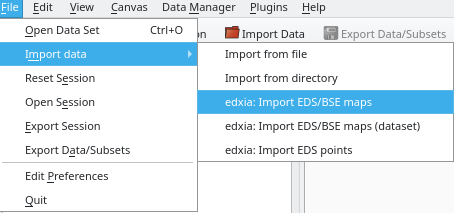
A successful installation: edxia options are available in the menu.
If these options are not available, it means that an error occurs when starting edxia in the glue environment. The following python command can provide more insight into the issue
import edxia
edxia.setup()
